Overview
The Mobile Payment SDK (For iOS & Android)
Is a solution for integrating secure payment processing functionalities directly into mobile applications. Developed, specifically for iOS and Android platforms, the PCI-compliant SDK libraries provide developers with the tools to streamline payment workflows and enhance user experiences on both major, mobile platforms.
The SDK libraries are engineered with robust encryption protocols and stringent compliance standards to ensure that every transaction is conducted securely, protecting sensitive payment information about potential threats.
This section documents the v2.x SDK (latest: 2.0.4). Compared to the legacy 1.4.x line it adds:
- Pay with SuperQi — a wallet payment method via QR code or deep link. In code it is identified as
ALIPAY; see the dedicated Pay with SuperQi guide. - Kurdish language support and a new localization API (
PaymentSDKLocalization) with a user-selectable language list (English, Arabic, Kurdish, or any ISO 639-1 code). - Configurable payment methods (
CARD,ALIPAY,PAYMENT_TOKEN,AQSATI) and an optional in-SDK method-selection screen (paymentMethodChoice). - Merchant branding (
Merchantobject) and grouped 3DS settings (TDSSettings). - Runtime reconfiguration — change language, theme, or payment methods without re-initializing.
The full attribute and method tables are in the SDK API Reference, and the version history is in the Release Notes. Docs for the legacy 1.4.x SDK are available under the 1.x entry of the version dropdown.
Key Features
-
iOS and Android Compatibility: With the separate SDK libraries tailored for iOS and Android platforms, developers can seamlessly integrate payment functionalities into applications while adhering to platform-specific guidelines and best practices.
-
Multiple Payment Methods: Beyond card payments and saved-card tokens, the v2.x SDK supports Pay with SuperQi (
ALIPAY). You control which methods are offered, and whether the SDK or your app renders the "choose payment method" screen. -
Card Payment Processing: The SDK libraries offer intuitive APIs that simplify the process of accepting card payments within iOS and Android applications, developers can effortlessly integrate payment processing capabilities to meet their specific business needs.
-
Multilingual UI: The payment screens ship in English, Arabic, and Kurdish, with RTL/LTR writing-direction control and an in-SDK language picker you can populate with the languages you want to offer.
-
PCI Compliance: The SDK libraries are PCI compliant, adhering to the strict security standards set forth by the Payment Card Industry Data Security Standard (PCI DSS). This compliance ensures that application meets the necessary requirements for securely processing and storing payment card data, providing peace of mind to both merchants and customers.
Important Note!
When creating a payment request for mobile SDK integration, you must include the appChannel boolean flag and set it to true in the request body. forgetting to do so will result in the Payment Gateway error: payment is not in app channel.
Overall Scheme for Payment Process with the SDK
How to perform a successful payment
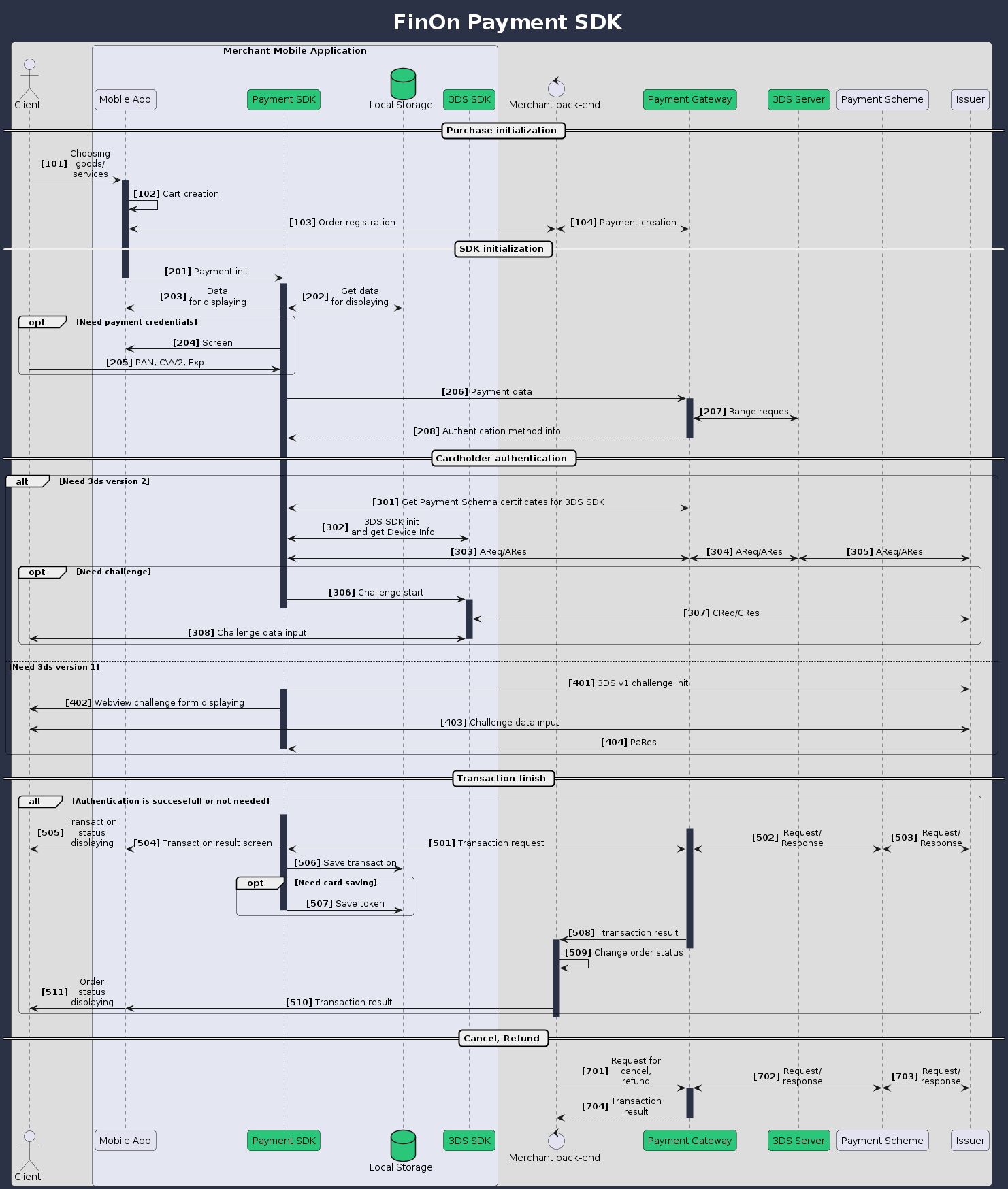
Mobile SDK Payment Flow Explained
-
Create Payment Request: Start by sending a create payment request to the Payment Gateway with the
appChannelflag set totrue. This enables the mobile payment channel and indicates to the gateway that this is a mobile payment transaction. -
Initialize the SDK: Once you receive the response, pass the following parameters to the Payment SDK's
processPaymentmethod:- Payment ID
- Request ID
- Amount
After
processPaymentis called, a payment form will be displayed to the end-user. -
User Picks a Payment Method (optional): If you configured
paymentMethodChoice = ON_SDK, the SDK first shows its own method-selection screen (e.g. "Pay by Card" / "Pay with SuperQi" / saved cards). WithON_APP(the SDK default) your app decides the method and passes it in the payment details instead. -
User Completes the Payment: For a card payment, the user enters their card details (PAN number, CVV, expiration date) into the secure payment form. For Pay with SuperQi, the user scans a QR code or is deep-linked into the SuperQi app to approve the payment — see the SuperQi flow. Either way, the rest of the flow (gateway processing, webhooks, result handling) is identical.
-
Payment Completion: After the payment is processed, the
processPaymentmethod completes execution and:- Returns a callback object with the payment result
- Displays a payment finish page (either a success or failure page)
-
Webhook Notification: The Payment Gateway sends a webhook API call to the merchant backend, informing them about the status of the payment transaction.
-
Merchant Response: The merchant uses the callback message to react to the payment termination and update the user interface accordingly (e.g., displaying an "Order Placed" or "Item Purchased" confirmation).